Baselines & Change Tracking
Jira Gantt chart baselines that show exactly where your schedule shifted
Save a snapshot of your project schedule at any point. Then compare it to your current timeline, side by side, right on the Gantt chart. Variance indicators tell you instantly which tasks slipped, which ones are ahead, and which ones stayed on track.
What you get
- ✓ Up to 10 baseline snapshots per project, each with a name and timestamp
- ✓ Side-by-side baseline bars alongside your current schedule on the timeline
- ✓ Variance indicators: green (On Schedule), yellow (Variance), red (Critical)
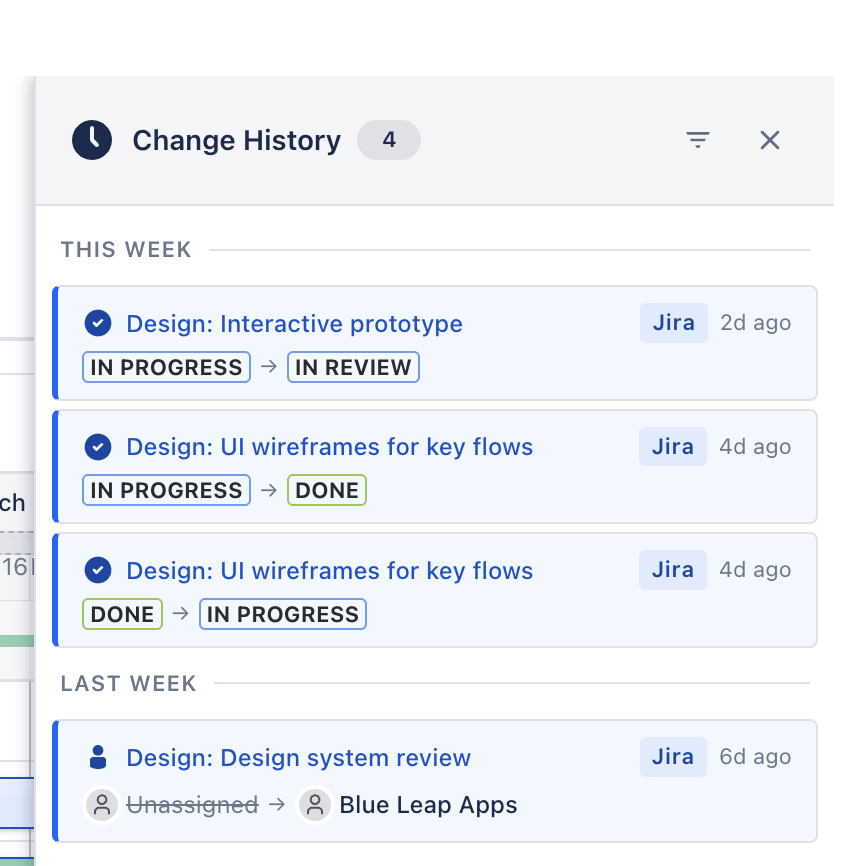
- ✓ Audit trail of your most recent changes (up to 100): date moves, dependency edits, phase updates
- ✓ Filter change history by task, user, change type, or date range
- ✓ Before/after values for every modification — see exactly what changed
- ✓ Click any change entry to navigate directly to the affected task
Baseline snapshots that capture your plan at a point in time
A baseline is a frozen copy of your project schedule — every task's start date, end date, duration, and dependencies as they were when you saved it. Create a baseline before a sprint starts, before a stakeholder review, or at any milestone. You can save up to 10 baselines per project, name each one, and switch between them to compare different versions of your plan.
When a baseline is active, Simple Gantt renders it as a second bar beneath each task on the timeline. The original planned dates appear in a muted color, and your current dates appear above them. At a glance, you see where the schedule expanded, contracted, or held steady.
Visual variance indicators for your Jira Gantt chart
Each task shows a variance status when a baseline is active. Green means the task is on schedule or ahead. Yellow means there's a moderate variance: the task has shifted but isn't critically late. Red means the variance has crossed a critical threshold and needs attention.
These indicators appear in the task list and on the timeline, so you can scan a large project and immediately spot trouble areas. There's no need to compare dates manually; the color coding does the work for you.
Change history and audit trail
Beyond baselines, Simple Gantt logs changes to your project in real time. Date changes, dependency additions, phase reassignments and task updates are each recorded with a timestamp, the user who made the change, and the before/after values. Change history keeps up to your 100 most recent changes per project (fewer if individual entries are large); older entries are removed as new ones are recorded, so it is a recent-activity record rather than a long-term archive.
Filter the change history by specific tasks, users, change types, or date ranges. When a deadline moves and someone asks "who changed this and when?", the answer is one click away. For a record that spans the whole project, use baselines — they are snapshots you save deliberately, so they are not affected by change-history retention.
How teams use baselines
Project managers save a baseline at the start of each phase or sprint. During status meetings, they toggle the baseline on and walk stakeholders through what changed and why. The visual comparison replaces vague "we're a bit behind" statements with specific data: "These three tasks slipped by a combined eight days, and here's what's driving it."
Baselines stay just as valuable after the project ends. During retrospectives, teams compare their saved snapshots to identify patterns — recurring scope creep, estimation issues on certain task types, or dependency changes that caused cascading delays. Change history complements this for recent activity, so review it while the work is still in flight rather than months later. This data makes the next project more predictable.
Your baseline snapshots and change history live in Atlassian-hosted Forge storage, not a vendor database. The audit trail stays as private as the Jira data it tracks.